
engineering · strategy
How we cut an AWS bill by 61%, line by line
We read an AEC client's AWS bill line by line and cut it 61%, about $26,900 a year. The order is the point: fix defects first, right-size next, buy discounts last.
By Julio Sarachaga

If you want to cut a cloud bill, do it in this order. Read the bill line by line. Fix the defects that are generating most of it. Right-size the compute against what it actually uses. Buy your discounts last.
We ran that sequence on an AEC client’s AWS account over two weeks in September. It’s a small B2B SaaS product, the kind of live service a 20-person team runs without a dedicated platform engineer, the sort of custom software we build and then keep healthy for AEC teams. The infrastructure bill went from $3,674 a month to $1,430, a 61% cut, about $26,900 a year.
Almost none of that came from buying cheaper capacity. The savings came from reading the bill closely enough to find what was broken, and then turning it off.
The bill is a health check, if you read it
Here’s the finding that made the whole exercise worth it. Most of the bill was paying for two defects nobody had noticed, plus three settings that had been switched on by accident. The cost of actually running the product was the smaller half.
That’s the part worth sitting with. A cloud bill isn’t just a number your finance team forwards around at month end. It’s a weekly readout of what your system is really doing. When it’s high, the usual reflex is to go shopping for discounts. But a high bill often means something is misbehaving, and the discount just locks in the misbehaviour at 20% off.
So we read the bill first, before touching pricing at all.
Step 1: read the bill against what the same services cost today
We pulled every service line from the August bill and put it next to what the same service costs now, after the fixes. One table, service by service. No summaries, no “compute” bucket hiding six things.
That comparison does two jobs. It shows you where the money is, and it shows you which lines moved when you changed something, which is how you prove a fix actually worked instead of hoping it did.
One honest detail here, because it bites people: reserved-instance and Savings Plan fees get booked by AWS as a lump on the day you buy them, not spread across the hours you use. If you compare a month with a purchase in it against a month without one, the math lies. We added those fees back into the current column by hand to keep the comparison fair.
Step 2: fix the defects before you buy anything
The single most expensive thing on the bill was a service that had been dead for nearly two months.
A worker that extracts data from PDF files had been restarting roughly once a minute since 8 July. Someone had renamed an environment variable in the code, but the running task was still pinned to an old definition that used the old name, so every restart failed on the same missing key. It had been crash-looping for 54 days, and no alarm had ever fired. The feature was simply gone, and nobody knew.
The outage is the real cost. The billing was almost a side effect, and it was still about $600 a month. Every restart re-pulled a 208 MB container image through the NAT gateway, which charges for the traffic, so a crash loop quietly moved about 293 GB a day. And a config recorder in the account was writing an item every time a task launched, so 1,400 launches a day had become 2,900 recorded changes a day. Two separate bills, both paying for the same broken loop.
That one finding sets up the whole argument for order. If we’d started by buying a discount on compute, we’d have committed a year of spend to a fleet that was partly on fire. Fix first. Then decide what the real, healthy size is.
We found five more like it, smaller but the same shape. Metrics being stored at about 70 times the resolution anyone actually reads on a dashboard. An “enhanced” monitoring tier switched on by a one-word typo in a config file, duplicating data another tool already collected. A second audit trail created by accident, billing for events the first one gave away for free. A database logging 106 GB a month of lines that carried no useful information. None of these are exotic. They’re the kind of thing that accumulates in any account that’s been shipping fast for a couple of years.
Step 3: right-size against measured load, not the docs
Both of the product’s backends were running on 4 vCPU and 8 GB of memory, in the development environment as well as in production use. The repo’s own documentation described smaller sizes. Those sizes hadn’t been true since March.
We measured the real load over a full week before changing anything. CPU averaged between 0.1% and 0.8%. Memory sat at 13 to 16% of what was allocated. So the machines were 2 to 4 times bigger than the work needed, and had been for months, paid for around the clock.
The word “measured” is doing real work in that sentence. It’s tempting to right-size off a guess, or off what the documentation claims, or off a single busy afternoon. We sized against the measured weekly peak per task, ran the change in development first, watched it, then rolled it to production. The fleet came down from 23 vCPU to just under 12, cutting the on-demand compute bill roughly in half, with nothing running hot afterwards.
Step 4: buy commitments last, and in plan-rate dollars
Only now, with the fleet fixed and right-sized, does it make sense to buy a discount. We bought three 1-year commitments with no money upfront: a compute Savings Plan and two sets of reserved database instances.
There’s a trap in this step that’s worth the price of the whole post. AWS Cost Explorer will recommend a Savings Plan commitment for you, as a dollar-per-hour number. For this account it recommended $1.133/hr. That recommendation was built from a 30-day lookback that straddled the old, oversized fleet, so it was sized for a system that no longer existed. Buying it would have committed about $9,925 to save less than $6 a month, with most of the commitment stranded.
The number we actually bought was less than half of that, because a Savings Plan commitment is denominated in plan-rate dollars, not on-demand dollars, and plan rates run about 20% below on-demand. Never buy a Cost Explorer headline figure without converting it to plan rates and re-checking it against your current, fixed fleet. The tool is doing its job. It just can’t know you fixed everything last week.
The piece we built, then switched off
Not everything we planned shipped, and the one that didn’t is the most useful thing to tell you about.
We built a schedule to shut the development environment down overnight and at weekends, worth about $92 a month. Then we switched it off before it ran. The team that uses that environment works from India, and they need it available around the clock. That’s a settled fact about how the client works, not a cost problem to solve.
We’re telling you this because cost work has a failure mode where someone cuts a number and breaks a workflow to do it. The cheapest environment is one that’s turned off. It’s also useless. The saving only counts if the people who depend on the system never feel it.
What the bill was actually telling us
Step back from the dollars for a second. A production feature was dead for 54 days and the first signal anyone got was a line on an AWS invoice. The bill got there before the monitoring did.
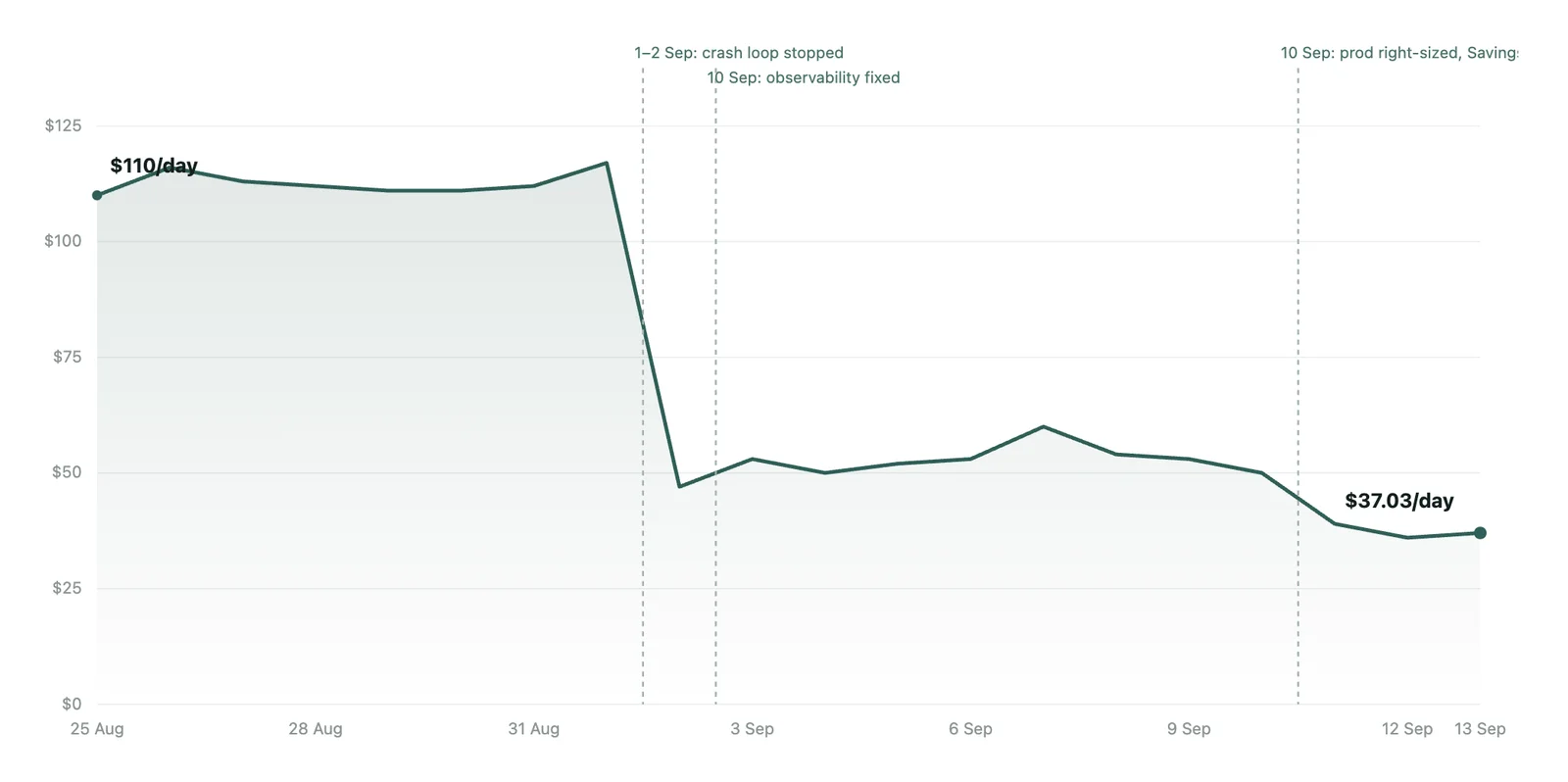
That’s the argument for reading it like a diagnostic. The daily-spend chart for this account wasn’t a smooth trend. It was a flat line that jumped one night in July and stayed there for 53 days. A clean step like that is almost always a configuration change, and it tells you the exact date something changed. Spend that jumps and holds is one of the most honest signals you have about the health of a system that isn’t watching itself.
Most teams we meet are in this spot for a good reason. They shipped fast, they’re small, and nobody’s job is to sit and read the bill line by line against last month. That’s fair. It’s also exactly the work that pays for itself in the first week.
If your cloud bill has been climbing and you’re not sure whether it’s growth or drift, that’s a question worth answering before you go looking for a discount. It’s the kind of read we do as part of our engineering consultancy, and we’re happy to take a look: get in touch.
What’s the oldest thing still running in your account that nobody remembers turning on?