
strategy · engineering
Agile with AI: the bottlenecks we hit and the tools we built
When AI made execution cheap, the bottleneck moved from writing code to reviewing and shipping it. Here's what broke in our workflow and the tools we built to fix it.
By Lagarsoft Engineering

When AI made writing code cheap, our bottleneck moved. It stopped being “write the feature” and became “review it, get it through CI, and merge it.” The keyboard was never the slow part anymore. The slow parts were the seams between writing code and shipping it.
We wrote a while back that agile’s values hold and the rituals change, and that we were still working out which rituals. This is the follow-up with the specifics. Three places our daily workflow started to bind, and the small tools we built to unbind them. One of them is open source, so you can read the exact rules it runs on.
The bottleneck moved from the keyboard to the seams
Here’s the shape of the problem. When one engineer with the right tools opens 4 or 5 pull requests in a day instead of 1, nothing at the writing stage breaks. Everything downstream does.
More PRs means more reviews waiting on a human. More PRs means more CI runs burning through the same monthly minute budget. And when most of your execution flows through one AI provider, a bad hour on their side becomes a bad hour for everyone at once. None of that shows up when you measure how fast you can generate code. It shows up as work sitting still, or as a bill you didn’t plan for.
So we went after the places where work sat still.
Seam 1: review became the constraint
Fast generation makes review the job. We already believed that. We wrote that QA stops being a phase and becomes the safety net, and that review moves up to naming the failure modes automated checks miss. But believing review matters doesn’t help if a PR sits for a day because nobody noticed it was waiting.
That was the real failure. Not bad reviews. Invisible ones. A PR would get approved with changes requested, the author would push a fix and reply, and then it would stall, because the reviewer had no idea the ball was back in their court. You had to check each repo by hand to find out. On a small team across several repos, nobody does that reliably.
So one of our engineers built a local app that does it for you. We open-sourced it: pr-review-notifier. It watches the repos you subscribe to and sorts every open PR into one of three buckets, checking GitHub every 5 minutes with a refresh button when you can’t wait:
- Needs review. Nobody but the author has commented or reviewed yet.
- Needs re-review. After the last reviewer comment, the author both pushed commits and replied. The ball is back with the reviewer.
- Waiting for author. Anything else, with a hint for what’s missing: a push, a reply, or “approved” if it’s ready to merge.
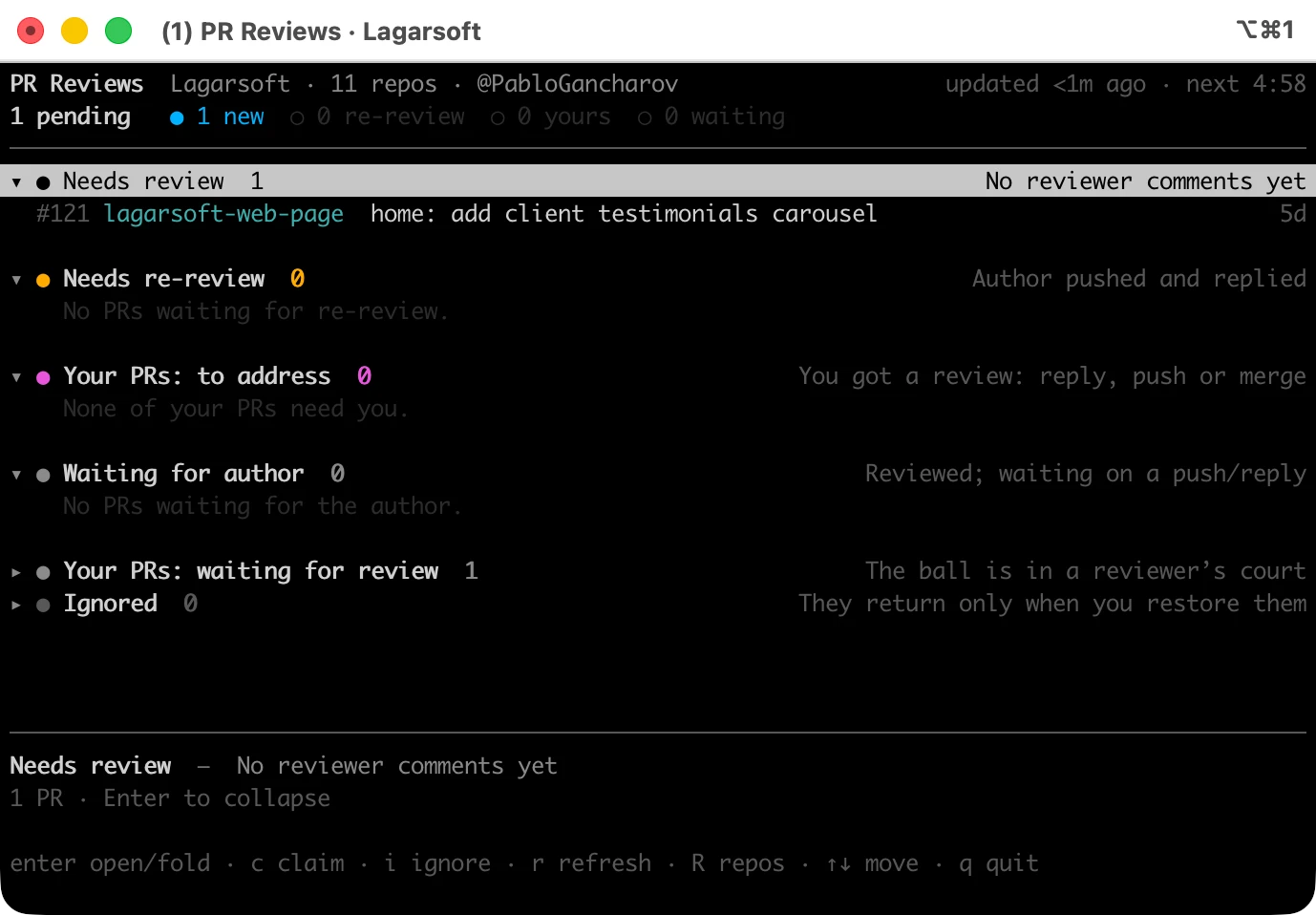
The detail that made it stick is the claim. In the Needs review list you claim a PR (the c key in the terminal) and it adds your 👀 to the PR on GitHub, so the rest of the team sees you’ve got it. The claim is good for one round only: once you leave a review it expires, and the app clears your stale 👀 on its own. No two people burning time on the same PR, no PR orphaned because everyone assumed someone else had it.
It runs on your machine, binds to 127.0.0.1, and stores your subscriptions in a local SQLite file. It uses your own GitHub token through the gh CLI. Drafts and bot PRs (dependabot, renovate) are filtered out so the list is only PRs that actually need a human.
The re-review rule is the part worth copying even if you never run the tool. “The author pushed and replied” is a precise signal that the conversation moved forward and it’s your turn. That’s the kind of strict contract the whole workflow now runs on: say exactly what “your turn” means, and a tool can track it for you.
Seam 2: the pipeline ran out of budget
More PRs means more pipeline runs, and every run costs minutes. That one is obvious in hindsight and painful in the moment.
Every PR kicks off the same fan-out: install dependencies, build, lint, type-check, run the test suite. Each of those minutes comes out of the same pool. Default GitHub plan includes 3,000 Actions minutes a month at no extra cost, and for a long time that was more headroom than we could use. Then PR volume climbed. One day the alert showed we’d burned 2,701 of those 3,000 minutes, 90 percent, with 23 days still left in the billing cycle.
Going over the included minutes isn’t free. You either start paying per minute, or you set a $0 budget that blocks all further Actions usage until the cycle resets, which means no CI for the rest of the month. Neither is a good place to be when merging depends on a green check. The cost crept up the same way our AWS bill crept up before we went through it line by line: a little waste per run, multiplied by a lot more runs.
So we stopped treating CI minutes as free and started treating them as a budget. When generation speeds up, the pipeline is no longer a background chore. It’s on the critical path to merge, and now it has a meter running. The goal became keeping CI inside the free tier: every minute a run spends should be a minute it needs, so the thing that gates every merge doesn’t also become the thing that stops when the month runs out.
Seam 3: when Claude is down, the whole team needs to know ASAP
This one caught us off guard. When most of your execution runs through Claude Code, a degraded API isn’t one person’s problem. It’s everyone slowing down at the same moment. And the first 10 minutes get wasted on the wrong question: is it my setup, my network, my prompt, or is it them?
So another small internal tool: a status icon that lives in the macOS menu bar and polls Anthropic’s status page. One glance tells you whether claude.ai, the Console, the API, Claude Code, and the rest are operational or degraded, before you start debugging a problem that isn’t yours.
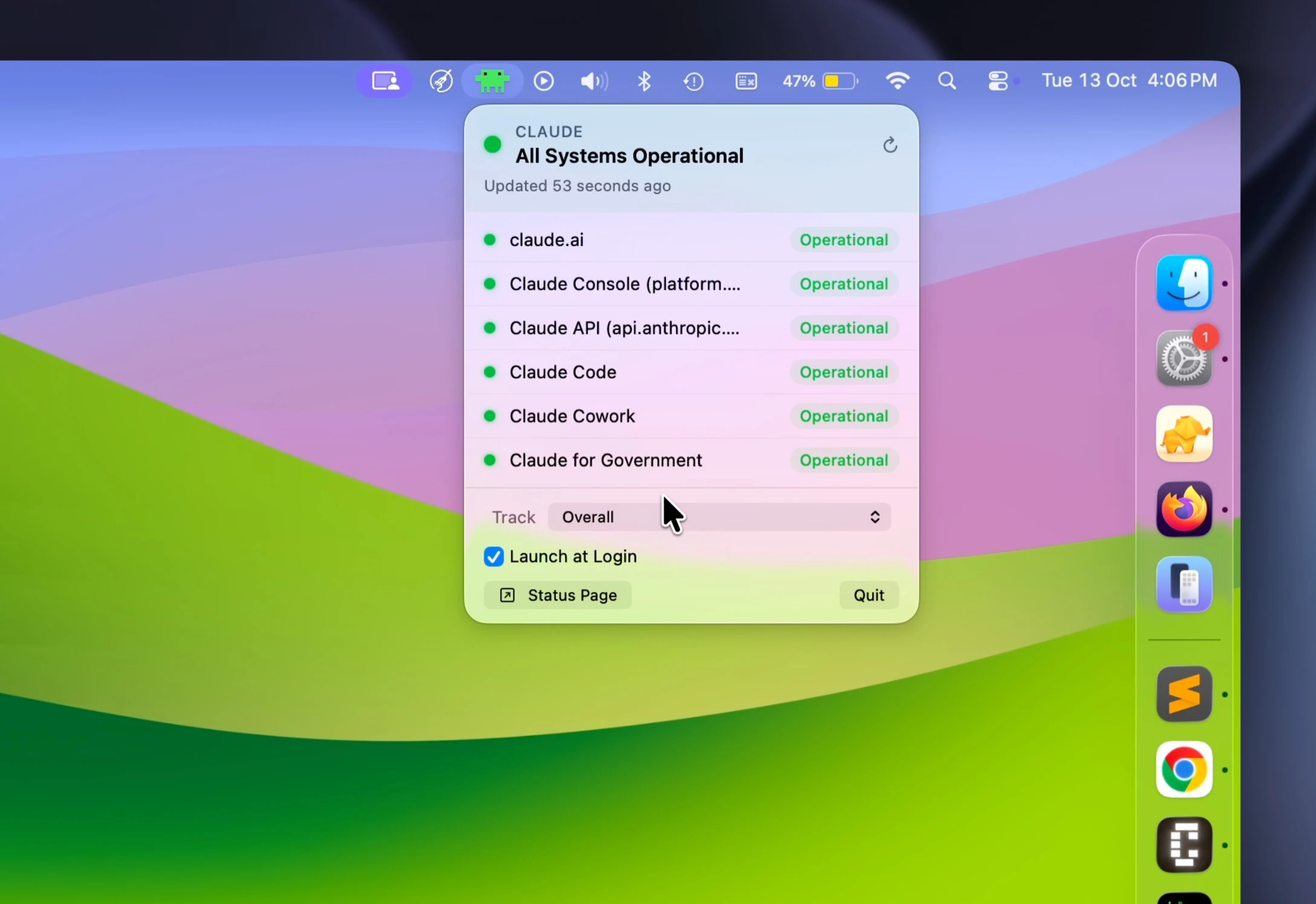
It’s a tiny thing. But it turned “why is everything slow today” from a 15-minute group investigation into a 2-second look at the menu bar. When the icon goes yellow, you stop fighting it, pick up something that doesn’t need the API, and come back when it’s green.
That’s a dependency we didn’t have two years ago. Worth building a 2-second check for.
How about agile ceremonies?
Most of what we built removed friction instead of adding a ritual. The review notifier, the CI budget work, the status icon: none of them is a meeting. Each clears a seam and gets out of the way.
One ceremony did earn its slot, though. When execution speeds up, so does the rate at which a team drifts apart: one engineer finds a sharper prompt, a cleaner way to structure a PR, a CI trick that saves ten minutes, and a week later half the team is still doing it the old way. The faster everyone moves, the faster that gap opens. So we added a weekly session where the team cross-shares what it’s learned: an interesting problem someone untangled, a new tool or workflow worth copying, a technique that saved an afternoon. It’s the one meeting that pays for itself, because it’s how the whole team keeps up with the pace instead of a few people pulling ahead.
That’s the same reading of agile we wrote about before: keep the ceremonies that earn their slot, drop the ones you run out of habit. The tools keep working software moving through the gate and the team responsive when something breaks. The weekly share keeps individuals and interactions healthy, the human kind, so a small team keeps moving as one.
The lesson we’d pass on: when you speed up one part of the system, watch the parts next to it. The bottleneck doesn’t disappear. It moves. Sometimes what’s sitting still is a pull request, and the fix is a tool. Sometimes it’s a person who hasn’t caught the new trick yet, and the fix is a conversation. Find where work is sitting still now, and build or schedule the smallest thing that gets it moving again.
If you’re scaling AI-assisted development and hitting the same walls at the seams, we’re happy to compare notes.