How to Protect Claude Artifacts: A Guide for Teams Building Real Tools
Four questions decide how to protect a Claude artifact, from keeping it as it is to rebuilding it as a real app. Follow the chart to find your path.
By Pablo Gancharov
engineering · strategy

Protecting a Claude artifact comes down to four questions: who uses it, whether it holds sensitive data, whether it has to outlive the person who built it, and whether it calls AI, stores data or needs a login. Answer them in order and you know whether to keep it as it is, export it, or rebuild it as a real application.
I’m Pablo, co-founder of Lagarsoft. We take AI-built software to production, and more and more of that software starts life as a Claude artifact. Someone on the team builds a calculator, a dashboard or a client portal in an afternoon. It works, people start relying on it, and nobody stops to ask who can see it or what’s inside it.
That’s not a reason to stop building artifacts. They’re one of the fastest ways to test an idea. It’s a reason to know which ones need protecting, and how.
Start here: which path is your artifact on?
Start at the top and answer each question. Most internal artifacts end at “Keep as artifact.” Every other branch ends with the artifact leaving Claude.
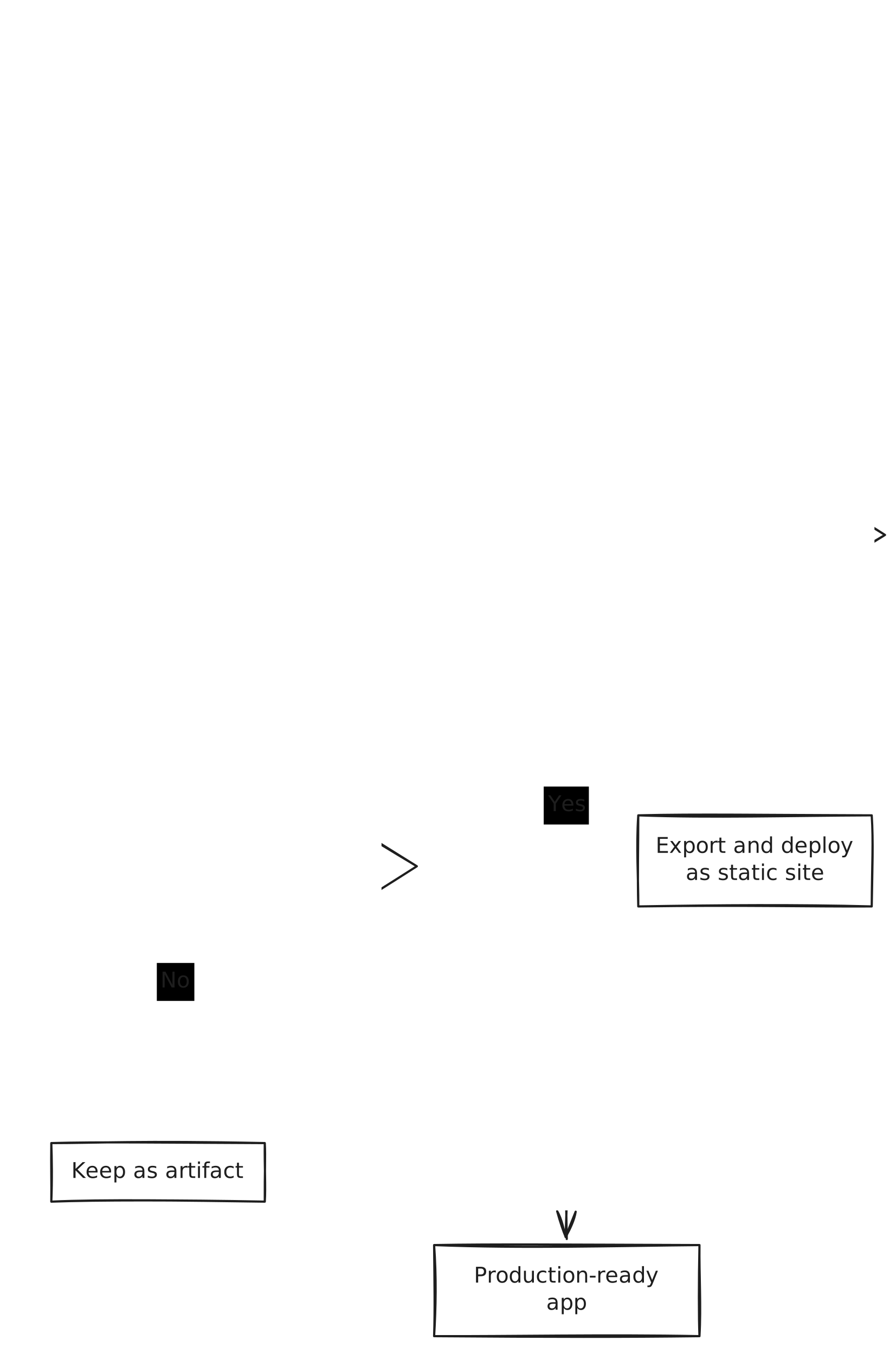
The sections below take the questions in the order the chart asks them.
Question 1: Who uses it?
The first split is whether everyone who opens the artifact is inside your Claude organization (or, on a personal plan, is you).
That line matters because of how Claude sharing works. Everyone needs a Claude account to open a shared artifact, even with the link. People you invite from outside your organization can open it, but the parts that rely on Claude or your connectors don’t work for them. And your customers shouldn’t have to sign up for Claude to use your pricing calculator.
If it stays inside your organization, get the sharing setting right before anything else:
- Use organization sharing, not a link. Claude lets you share an artifact with anyone who has the link, or invite specific people by email (in beta). On Team and Enterprise plans you can also share it with everyone in your organization, and an owner can turn off external sharing so links stop working outside the company. If your team is the only audience, share it with the organization.
- Audit what’s already shared. Open your list of artifacts and look for anything shared by link that shouldn’t be. Unshare it.
Claude’s sharing options change often, so confirm the current settings in Claude’s help center before you rely on them.
If people outside your organization use it, skip to Question 4.
Question 2: Does it hold sensitive or client data?
This is where most of the risk hides, because the tool feels internal. In practice, an artifact with real data inside it should be treated like any other application that holds that data.
Three things to look for:
- Data pasted into the code. Artifacts are often built by pasting a spreadsheet or a client list into the chat. That data then lives inside the artifact itself. Anyone who can open the artifact can read it, even if the screen only shows a summary.
- Keys and passwords. If someone added an API key, a database password or a token to make the tool “just work,” assume it can be read by anyone with access, and rotate it.
- Trusting an obscure link. A long, random URL is not access control. Links get forwarded, pasted into other tools and logged. If the only thing protecting the data is that nobody knows the link, it isn’t protected.
If the answer is yes, because the artifact touches client data, contracts, pricing or anything regulated, it has outgrown being an artifact. Organization-only sharing limits who can open it, but it doesn’t remove data or keys pasted into the code, and it gives you no logs or per-user permissions. That’s the point to talk to us.
And re-ask this question when the artifact changes. One that started with dummy data has a way of ending up with real data a few weeks later.
Question 3: Must it keep working if its creator leaves?
An artifact lives in the account of whoever made it. They decide who can open it, the conversation that produced it stays with them, and if they delete it, everyone they shared it with loses access. If they leave your organization, invitations they sent that nobody accepted stop working.
So the question is whether this is a personal tool or a business tool.
No: keep it as an artifact. A meeting-notes formatter, a unit converter or a prototype you’re showing internally doesn’t need more than Claude already gives you. If the person who built it leaves and it goes with them, nobody’s work stops. Rebuilding it would cost more than it’s worth.
Yes: it needs to live somewhere the company owns. If the quoting calculator half the team uses would vanish or end up in an account nobody can manage, it’s a business tool sitting in one person’s account. Move it out of that account and into something the company runs.
While you get there, detach it from the person who built it:
- Keep a list. Write down every artifact the team relies on, who built it and how it’s shared. A short page in a shared doc is enough.
- Keep the code in a place the company owns. Download it and put it in a company repository.
- Give it an owner by role, not by name. “The operations lead owns the quoting calculator” survives a resignation. A person’s name doesn’t.
- Add it to offboarding. Before someone’s account is closed, check what they built and who depends on it.
Question 4: Does it call AI, store data or need a login?
This is the question for any artifact that people outside your organization use: customers, partners, the public.
No: export it and deploy it as a static site
A pricing calculator on your website, an interactive explainer or a simple configurator doesn’t call an AI model, doesn’t save anything and doesn’t need anyone to log in. That makes it simple to host safely.
Before it goes live:
- Download the code and put it in a repository your company owns.
- Remove anything that isn’t meant to be public: test data, internal notes, comments and any keys.
- Host it on your own domain with a standard static host, so it carries your brand and you control it.
- Give it an owner. Someone needs to know it exists and fix it when a number or a rule changes.
This path is safe as long as the tool stays static. The moment someone asks it to remember a user, send an email or answer questions with AI, the answer to this question becomes yes. If you’d rather not do the export yourself, we can help.
Yes: it needs to become a real application
An artifact runs on Claude. Anthropic hosts it, Anthropic’s settings decide who can see it, and if it saves information, that information is stored on Anthropic’s side. Features that use Claude count against each viewer’s own usage limits. That’s fine for a prototype. A tool your customers depend on shouldn’t change every time the provider changes how artifacts work, and Claude has already changed how artifacts are shared at least once.
What a production-ready app adds
Every “yes” in the chart ends in the same place: the artifact becomes an application your company owns and runs. That means things an artifact was never designed to have:
- Real sign-in, so each user only sees their own information.
- A proper database, backed up, with data stored where your contracts say it should be.
- A protected AI connection. The model is called from a server you control, through an API, with your key and your usage limits. Otherwise anyone can run up your bill or misuse your account. You also choose the provider and can switch models without rebuilding the tool.
- Monitoring and logs, so you know when it breaks or when someone abuses it.
- A home that doesn’t depend on one person, in a company repository, with an owner by role.
- A security review before launch, not after the first incident.
The good news: the artifact isn’t wasted. It’s a working prototype that already proves the idea and shows what the screens should do. Rebuilding from a clear prototype is much faster than starting from a blank page. We’ve watched a one-off tool built in an hour turn into the spec for a real product feature.
Keep using Claude to build. Just don’t make it the only place the tool can run.
Quick answers
Are Claude artifacts public? Not by default. An artifact stays private to you until you share it. Once you share it by link, anyone with that link and a Claude account can open it. Older artifacts published from a chat follow legacy rules. Treat any artifact shared by link as public.
Can I password-protect a Claude artifact? Not with a password. You can share by link, inside your organization on Team and Enterprise plans, or (in beta) by inviting specific people by email. If you need a password, your own sign-in or access logs, export the artifact and host it somewhere that supports them.
Is organization-only sharing enough for sensitive data? It limits who can open it, which is a good start. It doesn’t fix data or keys pasted into the code, and it gives you no logs or per-user permissions. See Question 2.
What happens to a Claude artifact when the person who made it leaves? It stays tied to their account. If they leave your organization, invitations they sent that nobody accepted stop working, and people who already accepted keep access until someone removes them. If the artifact is deleted, everyone it was shared with loses access. Don’t count on the tool outliving the account: see Question 3.
Do people need a Claude account to use my artifact? Yes. Everyone needs a Claude account to open a shared artifact, even with the link (older artifacts published from a chat are the exception). Features that use Claude count against each viewer’s own usage limits. That’s fine for a team tool. For a tool your customers use, export it or rebuild it, depending on your answer to Question 4.
Not sure which path you’re on?
That’s what our Production Readiness Review is for. We look at what your team built, whether it started in Claude, another AI tool or a developer’s laptop, and tell you plainly what’s safe to keep, what needs fixing and what should be rebuilt. We’re a senior team and an Autodesk Platform Services Certified Partner, so we’re used to tools that real businesses depend on.